Explainer slides × timeline animation설명 슬라이드 × 타임라인 애니메이션
Explain it on a slide. Then make it move.슬라이드로 설명하고, 그대로 움직이게.
Build explainer slides and 2D animation on one canvas. Animate objects on each slide's timeline, edit the same .crim document by hand or with AI, and work in English or Korean.한 캔버스에서 설명 슬라이드와 2D 애니메이션을 만듭니다. 슬라이드마다 오브젝트를 움직이고, 같은 .crim 문서를 직접 또는 AI와 함께 고칩니다. 화면 언어는 한국어와 영어 중에서 고를 수 있습니다.
In private development · macOS · Windows · Ubuntu/Linux비공개 개발 중 · macOS · Windows · Ubuntu/Linux
Animation애니메이션
Every stroke is one line of animation모든 선이 애니메이션 한 줄
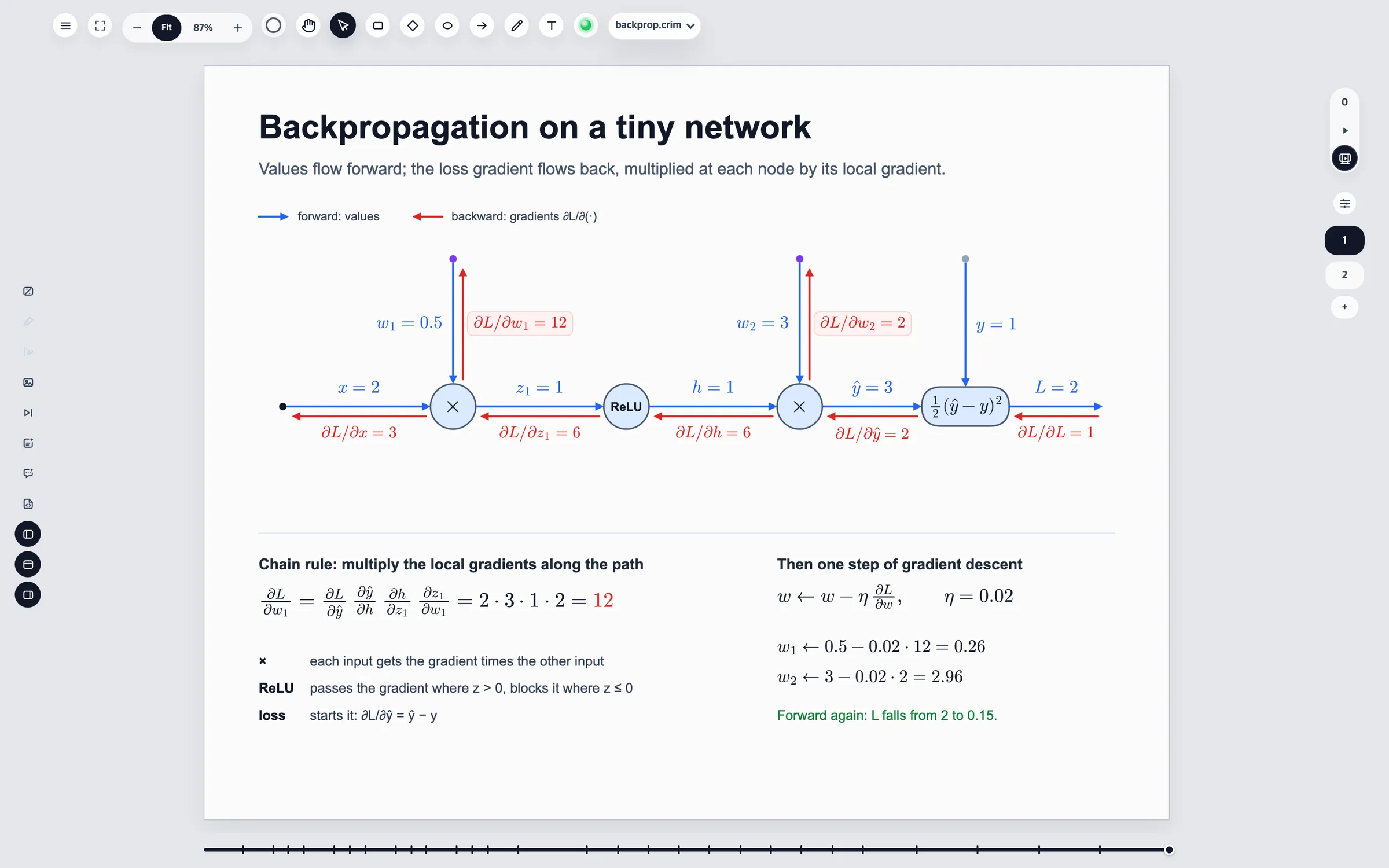
This is examples/backprop.crim playing in the editor. The forward pass draws on along its arrows, then the gradients flow back. Each arrow is drawn on by one strokeProgress line, and each label fades in with one opacity line.편집기에서 재생한 examples/backprop.crim입니다. 순전파가 화살표를 따라 그려지고, 이어서 기울기가 거꾸로 흐릅니다. 화살표는 strokeProgress 한 줄로 그려지고, 라벨은 opacity 한 줄로 나타납니다.
Each slide plays its own range, at real time.슬라이드마다 자기 구간을 실제 시간대로 재생합니다.
Curved arrows draw on along their path, head first.곡선 화살표도 경로를 따라 머리부터 그려집니다.
Step from one start point to the next with a click or a key.클릭이나 키 하나로 다음 시작 지점까지 넘깁니다.
Features기능
Built for explaining설명하기 위해 만든 도구
A clean canvas by default. Depth when you ask for it.기본 화면은 캔버스뿐. 필요한 기능은 필요할 때.
Canvas-first editing캔버스 중심 편집
Rectangles, ellipses, arrows, freehand paths, text and images. Arrows stay attached to the shapes they connect, and tools appear only when you reach for them.사각형, 타원, 화살표, 자유 곡선, 텍스트, 이미지. 화살표는 연결한 도형에 붙어 있고, 도구는 필요할 때만 나타납니다.
A timeline on every slide슬라이드마다 타임라인
Each slide plays its own range. Move, turn, fade, and draw strokes on along their path — then step through it one start point at a time.슬라이드마다 자기 재생 구간이 있습니다. 이동, 회전, 페이드, 경로를 따라 그리는 선까지, 시작 지점을 하나씩 넘겨 가며 볼 수 있습니다.
Math that looks right제대로 보이는 수식
Labels typeset with MathJax, mixed with words or on their own, and kept at the same size on every device.MathJax로 조판한 라벨을 글과 섞거나 단독으로 씁니다. 기기가 달라도 같은 크기로 보입니다.
A file you can read읽을 수 있는 파일
A deck is plain, declarative .crim text. Diff it, review it, generate it — the canvas and the file stay in sync both ways.덱은 선언적인 .crim 텍스트입니다. diff로 비교하고, 리뷰하고, 생성하세요. 캔버스와 파일은 양쪽으로 맞춰집니다.
An AI that edits the slide슬라이드를 고치는 AI
Box what should change and leave a note, then ask the built-in chat — on your own ChatGPT plan — to fix it. Each change is one undo step.고칠 곳에 메모를 남기고 내장 채팅에 고쳐 달라고 하세요. 내 ChatGPT 요금제로 동작하고, 변경은 실행 취소 한 번으로 되돌립니다.
Export from the canvas캔버스 그대로 내보내기
A slide as PNG, its animation as WebM — recorded from the same canvas you edit on.슬라이드는 PNG로, 애니메이션은 WebM으로. 편집하는 그 캔버스에서 그대로 녹화합니다.
.crim
The canvas and the file are the same document캔버스와 파일은 같은 문서
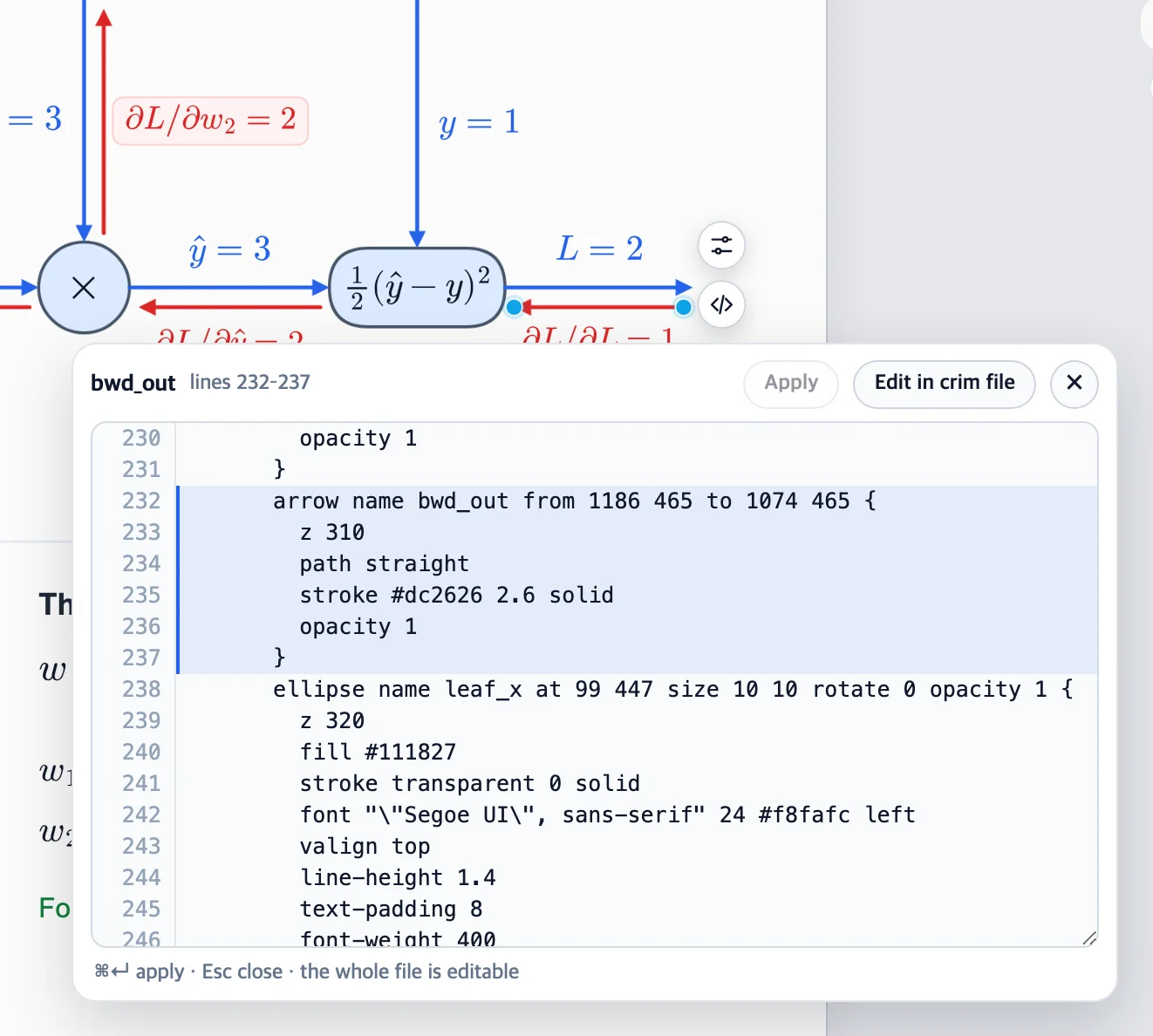
Every slide, object, animation and note lives in one text file. Select an object and choose View in crim file to see its lines highlighted beside it. Change a value and press Ctrl + Enter (⌘ + Enter on Mac). The canvas updates in one undo step.슬라이드, 오브젝트, 애니메이션, 메모가 모두 텍스트 파일 하나에 들어 있습니다. 오브젝트를 선택하고 crim 파일에서 보기를 누르면 그 줄이 옆에서 강조됩니다. 값을 고치고 Ctrl + Enter(Mac은 ⌘ + Enter)를 누르면 캔버스에 반영되고, 실행 취소 한 번으로 되돌릴 수 있습니다.
Prefer text? Edit in crim puts the whole file where the canvas was. A mistake shows its line and leaves the canvas untouched.텍스트가 더 편하다면 crim으로 편집으로 캔버스 자리에서 파일 전체를 편집하세요. 문법이 틀리면 그 줄을 알려 주고 캔버스는 그대로 둡니다.
backprop.crim
slideby-hand"Backpropagation on a tiny network" {
scene {
arrow namefwd_yhatfrom820 452to952 452 {
stroke#2563eb2.6 solid
}
text namefwd_yhat_labelat859 415size56 27 {
content"\\(\\hat y = 3\\)"
}
}
animate {
@fps30@range0f 252fanimatefwd_yhat.strokeProgress 0 -> 1from58fto70fease in-out
animatefwd_yhat_label.opacity 0 -> 1from66fto76fease out
}
}
An arrow's lines, highlighted in the file — edit them right next to the arrow.화살표의 줄이 파일 안에서 강조됩니다. 화살표 바로 옆에서 고칩니다.
AI annotate
Point at it. Your AI reads the rest.가리키면, 나머지는 AI가 읽습니다.
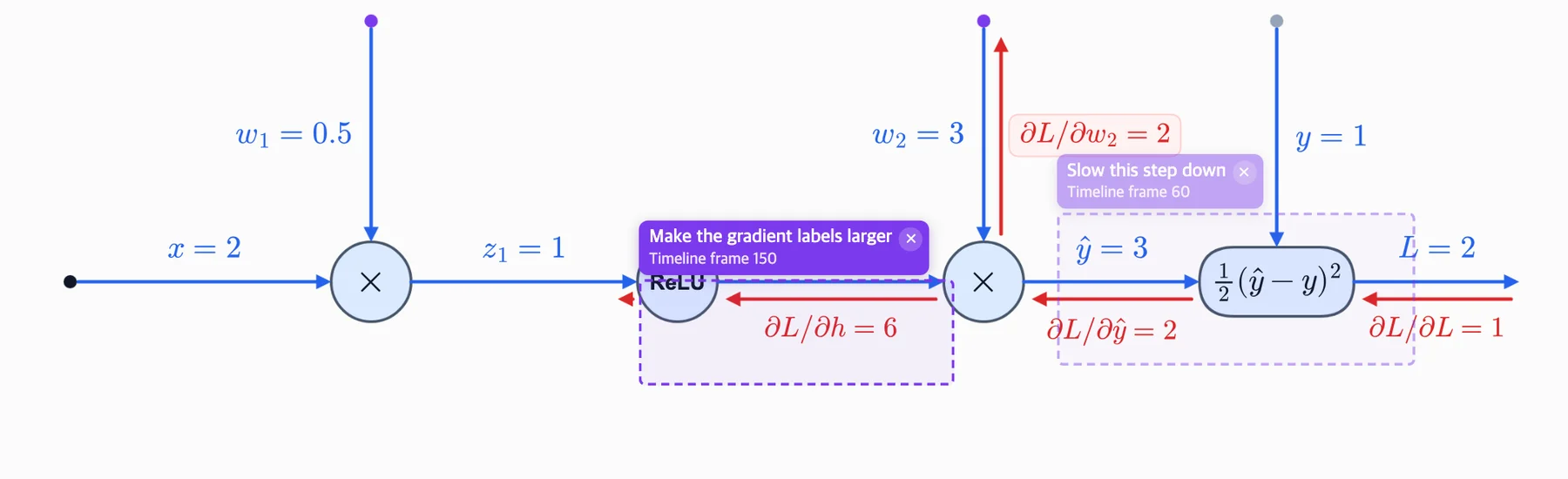
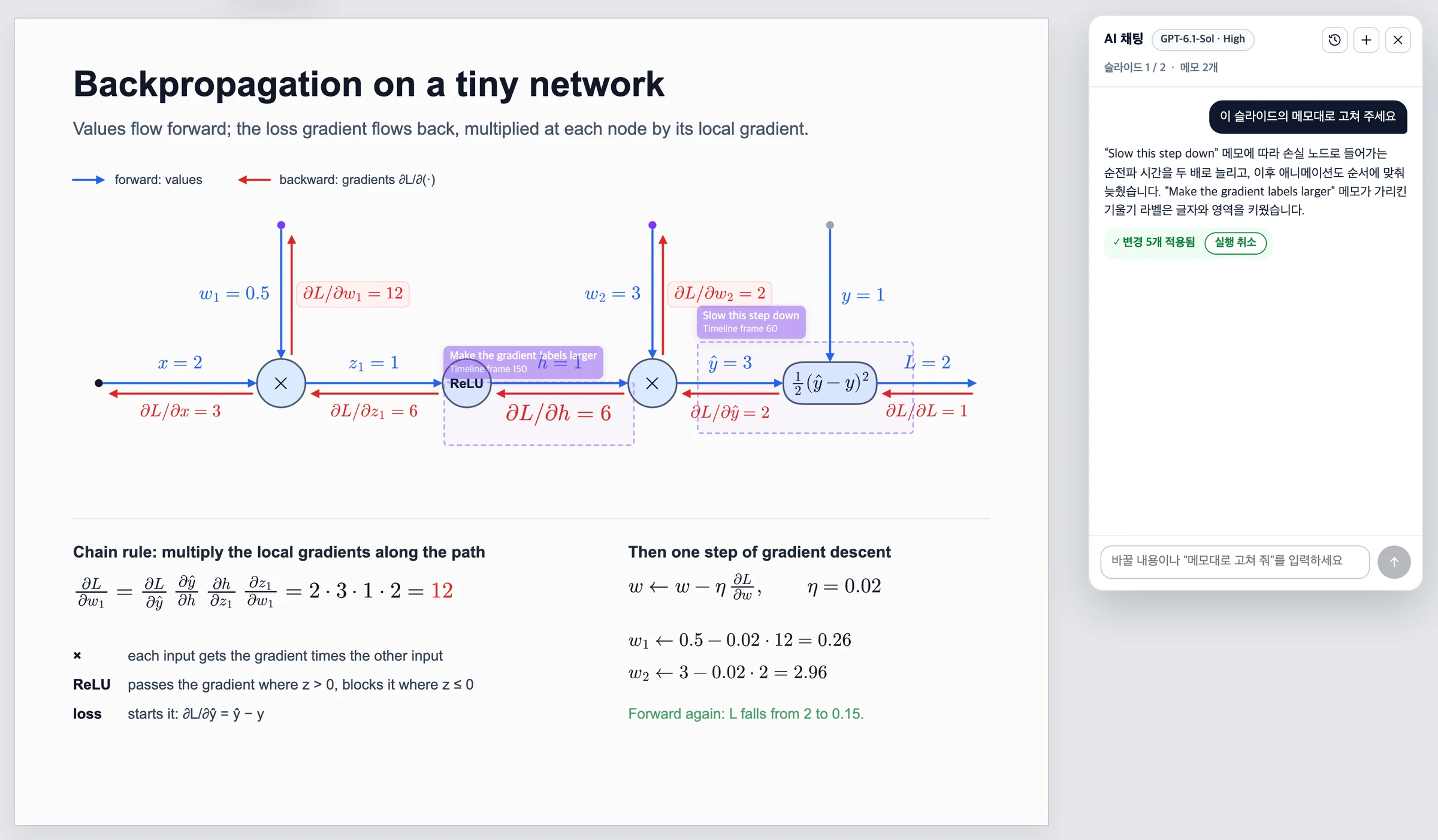
Turn on AI annotate, draw a box over what needs work and write a comment. On an animated slide the note belongs to the frame on screen: it says Timeline frame N, fades on other frames, and puts a dot on the slide timeline.AI annotate를 켜고, 고칠 곳에 사각형을 그리고 코멘트를 적으세요. 애니메이션이 있는 슬라이드에서는 메모가 화면에 보이던 프레임에 속합니다. Timeline frame N이 표시되고, 다른 프레임에서는 흐려지며, 슬라이드 타임라인에 점이 찍힙니다.
Notes never render or export. They are saved in the file, with the frame and the objects under them, so an agent knows exactly what you meant:메모는 화면 출력이나 내보내기에 나오지 않습니다. 프레임과 그 아래 오브젝트 이름과 함께 파일에 저장되므로, 에이전트가 무엇을 말하는지 정확히 압니다.
At frame 150, the note written at frame 60 is faded, not hidden.150 프레임에서는 60 프레임에 쓴 메모가 흐려질 뿐 사라지지 않습니다.
Chat with AI
Ask for a change. Watch the slide follow.말로 고치고, 슬라이드에서 바로 확인.
Connect your ChatGPT account from the light in the top bar and choose a model and reasoning effort. Crimate uses your ChatGPT plan, without an API key. Float the chat over the canvas or dock it beside the slide while you work.상단의 신호등에서 ChatGPT 계정을 연결하고 모델과 추론 강도를 고릅니다. API 키 없이 내 ChatGPT 요금제로 동작합니다. 채팅을 캔버스 위에 띄우거나 슬라이드 옆에 붙여 두고 작업할 수 있습니다.
Menus, tools and chat follow your choice of English or Korean in Preferences. Your slides and saved conversations keep their original text.환경설정에서 한국어와 영어를 바꾸면 메뉴, 도구, 채팅 화면에 바로 적용됩니다. 슬라이드와 저장된 대화의 글은 그대로 유지됩니다.
Ask for a change or point to it with a frame-specific AI note.원하는 변경을 말하거나, 특정 프레임의 AI 메모로 고칠 곳을 가리킵니다.
Use @2 to choose the slide to edit. Attach other slides or decks as read-only references.@2처럼 수정할 슬라이드를 고르고, 다른 슬라이드나 덱을 읽기 전용 참고로 붙입니다.
Edits are checked before they apply. One reply is one undo step; save the document when you're ready.변경은 검사 후 적용하며, 답 하나를 실행 취소 한 번으로 되돌립니다. 문서는 원할 때 저장합니다.
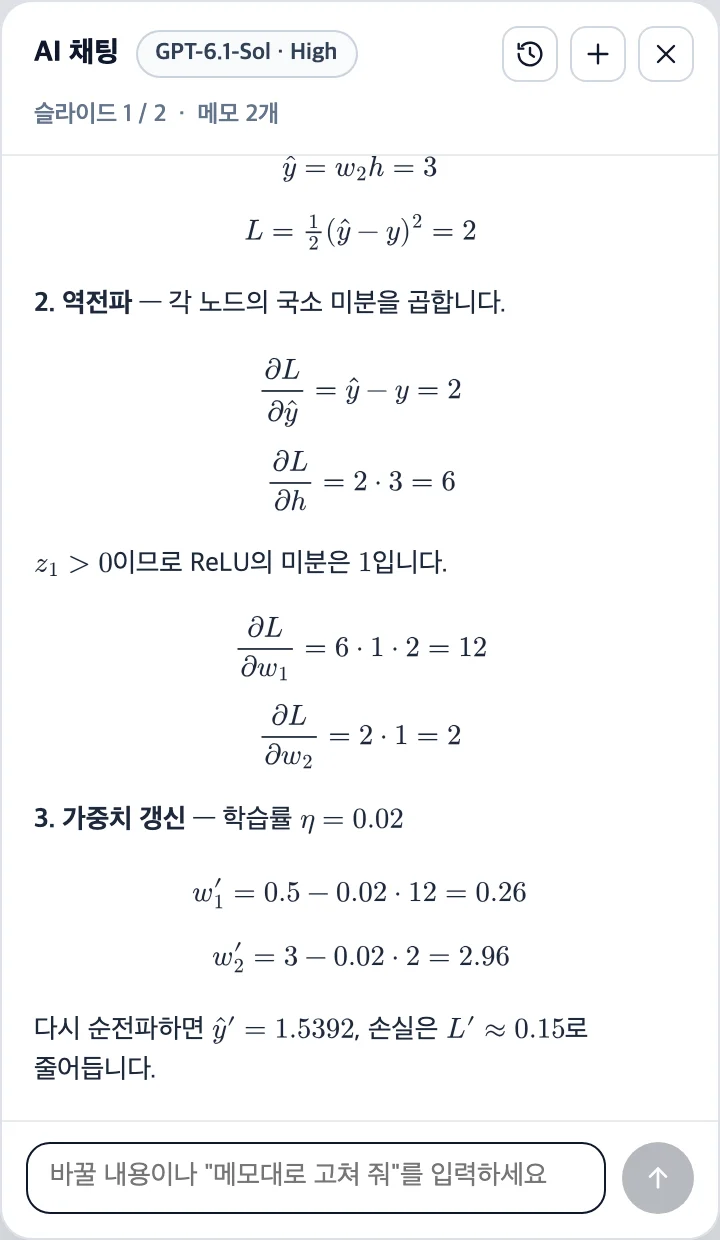
See typeset formulas and diagram previews in replies. Conversations save by file and can be reopened, renamed or deleted.답 안에서 수식과 도형 미리보기를 봅니다. 대화는 파일별로 저장되며 다시 열기·이름 변경·삭제가 가능합니다.
A question gets an answer, formulas typeset.질문하면 수식까지 조판해서 답합니다.
One request, both notes: the forward step into the loss now takes twice as long, and the gradient label under the note is larger — five changes, one undo step.요청 한 번에 메모 두 개를 반영했습니다. 손실로 들어가는 순전파 단계는 두 배로 느려지고, 메모가 가리킨 기울기 라벨은 커졌습니다. 변경 다섯 개가 실행 취소 한 번입니다.
Bring your reference material내 자료를 참고하며 작업
Allow specific folders in Preferences so AI can read text, code, PDFs and images. Access is read-only and you can revoke it at any time. In the web app, these folders are on the server computer.환경설정에서 허용한 폴더의 텍스트, 코드, PDF, 이미지를 AI가 읽고 참고합니다. 읽기 전용이며 언제든 권한을 해제할 수 있습니다. 웹 앱에서는 서버 컴퓨터의 폴더를 읽습니다.
Look things up, with sources출처와 함께 웹 검색
Turn web search on when a question needs outside sources. Cited pages appear as links with the reply. After local file tools run, web search stays off for the rest of that request.외부 자료가 필요한 질문에는 웹 검색을 켭니다. 인용한 페이지는 답 아래 링크로 표시됩니다. 로컬 파일 도구를 사용한 뒤에는 해당 요청의 웹 검색을 중지합니다.
Platforms & availability지원 플랫폼과 공개 현황
One editor, on your desktop내 데스크톱에서 쓰는 편집기
Desktop packaging is in place for macOS, Windows and Ubuntu/Linux. Crimate is still in private development; public downloads are not available yet.macOS, Windows, Ubuntu/Linux용 패키징을 지원합니다. 현재 비공개 개발 중이며, 공개 다운로드는 아직 제공하지 않습니다.
.dmg / .zip
macOS
A Mac app for Apple silicon and Intel, with native file dialogs and .crim file opening.Apple silicon과 Intel용 Mac 앱입니다. 기본 파일 대화상자로 열고 저장하며 .crim 파일을 연결해 엽니다.
.exe
Windows
An installer with a desktop shortcut, native open and save dialogs, and .crim file associations.설치 파일로 앱과 바탕 화면 바로가기를 추가합니다. 기본 열기·저장 창과 .crim 파일 연결을 지원합니다.
.AppImage
Ubuntu / Linux
An AppImage build target for the same canvas, timeline and AI tools on Linux.Linux에서도 같은 캔버스, 타임라인, AI 도구를 쓰도록 AppImage 패키징을 지원합니다.
Also in the browser브라우저에서도
The same editor runs from a private server, with AI chat and file access on that server. A public hosted service is not available yet.같은 편집기를 개인 서버에서 실행하고 브라우저로 접속할 수 있습니다. AI 채팅과 파일 접근은 그 서버에서 동작하며, 공개 호스팅 서비스는 아직 제공하지 않습니다.
Updated 기준
Built with사용 기술TypeScriptReactElectronCanvas 2DMathJaxOpenAI Responses API